
One platform · Four industries

Talk it out. Get the record.

ByldGo™ builds AI-powered apps that turn what your crew says on the job into a clear, timestamped record, so the work gets documented while it’s fresh, not at 9 p.m. at the kitchen table.

Voice-first field documentation for construction, restoration, commercial cleaning, and property management.

✓ Speak in English or Spanish✓ AI drafts the record✓ A person reviews & submits

FieldLog for general contractors is live on the App Store and Google Play, and ready for subscriptions. RestoreScribe, CleanScribe, and ManageScribe are in development.

Watch the introduction · 0:30
Read the video transcript

It's nine p.m., and you're still digging through your phone. Photos here. Texts there. Readings on a clipboard. Your whole day, scattered. With ByldGo, you just talk. AI turns it all into one professional report. In seconds. FieldLog for contractors. RestoreScribe for restoration. CleanScribe for cleaning. ManageScribe for property management. ByldGo. Every Job. On the Record. byldgo.com

A simple way to log

Speak it. Review it. Submit it.

Every ByldGo™ app does the same job: your team speaks the update, AI drafts the record, and a person reviews it.

1. Speak

Say what happened on site, in English or Spanish. No typing in wet boots or work gloves.

2. AI drafts

The app turns your voice, photos, and details into a clear, structured record.

3. Review & submit

A person checks the draft and submits it, so there’s one accountable record.

Our apps

One platform. Four industries.

FieldLog is live and ready for subscriptions. The three Scribe apps below are in active development and coming soon.

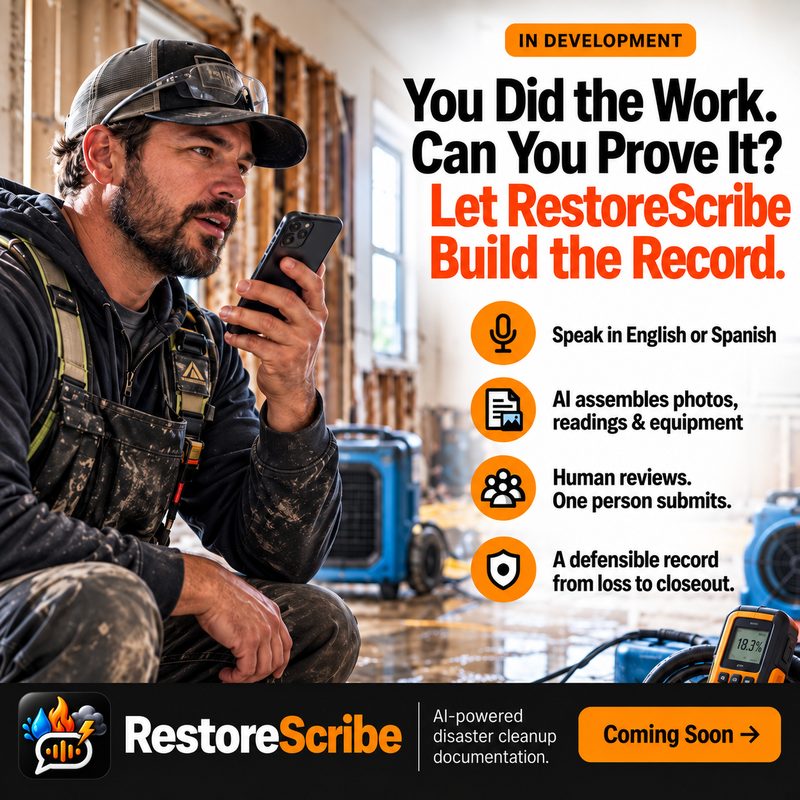
RestoreScribe: You did the work. Can you prove it? Let RestoreScribe build the record.Click to enlarge
In development · Restoration
RestoreScribe icon

RestoreScribe

Voice-first documentation for water, fire, and storm restoration contractors. Techs talk through the job on site, and AI assembles photos, moisture readings, and equipment into a clean job record. One person reviews it and submits it.

Watch RestoreScribe · 0:30

  • Speak in English or Spanish — no typing in wet boots
  • AI builds the job record from your voice, photos, readings, and equipment
  • Track drying, equipment, and new conditions day by day, room by room
  • Human reviews. One person submits. One accountable record, loss to closeout
See the pain points it solves ↓In development · available soon.
CleanScribe: You clean the buildings. Let CleanScribe document it.Click to enlarge
In development · Commercial Cleaning
CleanScribe icon

CleanScribe

Voice-first service logs for professional cleaners and janitorial crews. Say what you cleaned, what you found, and what you need — and AI writes the service log, with photos organized by location and time, ready to share with the people you clean for.

Watch CleanScribe · 0:30

  • Speak in English or Spanish — quick, hands-free updates from the floor
  • AI creates detailed service logs: areas cleaned, tasks completed, issues, supplies, and more
  • Photos with context, automatically organized by location and time
  • Prove your work. Share with clients, property managers, and owners
See the pain points it solves ↓In development · available soon.
ManageScribe: You manage the properties. Let ManageScribe keep the record.Click to enlarge
In development · Property Management
ManageScribe icon

ManageScribe

Voice-first property logs for facility managers and property teams. Speak updates as you walk your rounds, and AI creates detailed property logs, so every inspection, repair, and vendor visit has a record behind it.

Watch ManageScribe · 0:30

  • Speak in English or Spanish — quick updates from any property during your rounds
  • AI creates detailed property logs: inspections, maintenance, repairs, vendor work, and more
  • Photos with context, automatically organized by property, location, and time
  • Keep everyone informed. Share with owners, tenants, vendors, and stakeholders
See the pain points it solves ↓In development · available soon.
Pain points we’re solving

Built around how the work really goes.

Construction, restoration, cleaning, and property teams all share the same problem: the work happens in the field, but the documentation happens later, from memory. Here’s what each market runs into and how each app helps.

1FieldLog iconFieldLogConstruction

Daily logs get written at the end of a long day.

The problemAfter ten hours on site, the log gets typed from memory, or skipped, and details like crew counts and delays get fuzzy.

The FieldLog fixTalk it out. AI writes the log.Speak the update from the field. AI drafts a structured daily log: work summary, crew, hours, materials, safety, delays, visitors, and tasks.

Records can be changed after the fact.

The problemWhen a delay or a safety issue is disputed months later, a log that anyone could have edited carries little weight.

The FieldLog fixSealed and timestamped on submit.Submitted logs are immutable. Corrections are linked amendments, never silent edits, so the original record always stays intact.

Subcontractor documentation is spotty.

The problemSubs log late, log differently, or don’t log at all, and chasing them for paperwork eats the GC’s day.

The FieldLog fixEvery sub logs their own work.Each sub keeps their own log with no visibility into other subs. Messaging and push reminders keep the daily records coming in.

Delays and weather get argued after the fact.

The problemA rain-delay claim with nothing to back it up, or a crew count that doesn’t add up, surfaces only when it’s too late to fix.

The FieldLog fixWeather frozen on every log, issues flagged.The day’s weather is recorded onto each log automatically. AI flags crew-count swings, weather delays the record doesn’t support, and safety keywords, and you approve before anything seals.

Mixed-language crews and owners who want updates.

The problemCrews and subs speak different languages, and owners keep calling for status because they can’t see the daily record.

The FieldLog fixEnglish and Spanish, plus an owner portal.Logs, messages, and tasks auto-translate between English and Spanish, with tap-to-see-original. Owners get a no-login portal with read-only daily reports.

2RestoreScribe iconRestoreScribeRestoration

Paperwork happens after the job, if at all.

The problemTechs finish a long day on site, then hand-type notes, readings, and equipment counts from memory at night.

The RestoreScribe fixDocument while you work.Talk through the job on site, in English or Spanish. AI turns it into a structured job record, so nothing waits until tonight.

Drying progress and equipment are hard to track.

The problemDehumidifiers and air movers get moved between rooms, readings sit on clipboards and phones, and nobody can reconstruct day three.

The RestoreScribe fixDrying, equipment, and readings in one record.AI assembles photos, readings, and equipment by day and by room, so the drying story is complete from set-up to pickup.

New conditions get found and then forgotten.

The problemHidden moisture, damaged materials, or surprise mold show up mid-job and never make it into the file when they’re discovered.

The RestoreScribe fixFlag it the moment you see it.Say it, snap it, and the new condition is logged with the time and photo, ready for review instead of buried in a text thread.

Thin or inconsistent records invite pushback.

The problemAdjusters, carriers, and customers question scope when the job file has gaps or every tech documents differently.

The RestoreScribe fixOne consistent, timestamped record per job.Every job is built the same way, from loss to closeout, so the file shows what was found, what was done, and when.

Crews speak more than one language.

The problemEnglish-only forms and apps leave capable techs struggling to write up their own work.

The RestoreScribe fixSpeak the way you think.Techs talk in English or Spanish. Then a human reviews the draft and one person submits, so there’s a single accountable record.

3CleanScribe iconCleanScribeCommercial Cleaning

“It wasn’t cleaned” is hard to argue.

The problemWhen a client or property manager questions the work, there’s no proof of what was done, where, or when.

The CleanScribe fixPhoto-backed proof of work.Photos are organized by location and time and tied to the service log, so you can show exactly what was done and when.

Checklists and sign-in sheets get lost or filled in late.

The problemPaper checklists get filled out at the end of the shift, or in the parking lot, or not at all.

The CleanScribe fixLog as you go, hands-free.Speak quick updates from the floor. AI writes the service log: areas cleaned, tasks completed, issues, and supplies.

Problems get mentioned, then forgotten.

The problemA leak, a damaged fixture, a locked room, or a spill hazard is told to a supervisor in passing and never written down.

The CleanScribe fixIssues are captured in the log.Anything the crew reports goes into the service log with a photo, location, and time, so supervisors see it and it can’t be quietly lost.

Supply shortages show up too late.

The problemThe cart runs out of liners or chemical mid-shift because nobody recorded that it was running low.

The CleanScribe fixSupplies noted as you work.Crew members mention what’s low or missing, and it appears in the log so it can be restocked before the next visit.

Language barriers on the crew.

The problemEnglish-only forms slow down experienced cleaners who would rather just say what they did.

The CleanScribe fixEnglish or Spanish, no typing.Crew members talk the way they talk. AI does the writing, and you share the finished log with clients, property managers, and owners.

4ManageScribe iconManageScribeProperty Management

Rounds produce scattered notes.

The problemObservations end up in texts, sticky notes, and camera-roll photos that aren’t tied to a unit, an area, or a date.

The ManageScribe fixSpeak as you walk.Talk through your rounds. AI documents what you saw into dated, consistent inspection records instead of loose notes.

Open issues slip through the cracks.

The problemA flickering hallway light or a slow leak gets reported, nothing happens, and no one is sure who owns it.

The ManageScribe fixTrack issues from found to fixed.Issues are captured the moment you spot them and followed until the repair is documented, so nothing quietly ages out.

Vendor work is hard to verify.

The problemDid the vendor show up, what did they actually do, and was it finished? The answer is usually “ask around.”

The ManageScribe fixVendor work on the record.Log vendor visits, repairs, and follow-ups against the issue they belong to, so you can see what was done and what’s still open.

Owners, tenants, and vendors keep asking for updates.

The problemEvery “what’s going on at the property?” becomes a scramble through texts, emails, and phone calls.

The ManageScribe fixKeep everyone informed.Inspections, repairs, and maintenance build into one record per property, ready to share with owners, tenants, vendors, and stakeholders.

Our philosophy

Built by operators, for operators.

ByldGo™ is an umbrella company creating focused, no-nonsense software for the people who actually do the work: on jobsites, in loss sites, inside commercial buildings, and across the properties they keep running.

We'd rather ship one app that actually works than five apps that sort of do.

Start with a real problem

Documentation is the most repetitive, easiest-to-skip part of field work, whether you pour concrete, dry out a flooded building, clean an office tower, or manage a property. FieldLog came first. The Scribe apps carry the same idea into three more trades.

Obvious, small, and fast

Great tools should feel obvious, small, and fast. If your crew can talk, they can use it. No bloated, do-everything platform required.

One app, one login

Every app has its own account and its own login. No shared sign-on between products, so each one stays simple and self-contained.

The ByldGo™ lineup

Keep in touch

Want to know when the next apps launch?

FieldLog is live now. Get updates and be first to know when RestoreScribe, CleanScribe, and ManageScribe become available.

  • First to know when each new app launches
  • No spam, just the good stuff
  • Unsubscribe anytime